Showing posts with label Graphic Programming. Show all posts
Showing posts with label Graphic Programming. Show all posts
Building your Java project into executable in NetBeans
Okay, you created your graphics application abd already knows how to do multiple applications.
But you want to show to the whole world yours fantatics programs, how to do? Will send the project folder to the others? Will send them to download NetBeans to run yours programs in Java?
Of course not. You have to do the build and send your program all ready to be used for the world.
We will show how to make yours Java project in executables.
Graphical Application: shows the roots of a quadratic equation in Java
Java exercise using Dialog Box:
Write a program that receives the coefficients of a quadratic equation and returns its roots, even complex ones, through dialog boxes.

Write a program that receives the coefficients of a quadratic equation and returns its roots, even complex ones, through dialog boxes.
How to pass variables of type String to int, float and double
In the past two articles we learned how to display messages and receive data from the dialogs box.
However, we note that the dialogs see everything as String type.
We will teach now, in our Java course how to transform what was typed as string to integer, float, double ...
Getting user data through dialogs boxes
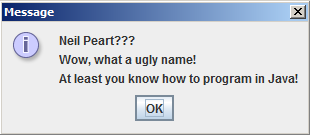 We saw in the last article that the dialog boxes are very used to display messages (mainly for errors and alerts), and show how to do this in Java.
However, it can also be used (and we show how to do this) to receive data from the user by an interface more friendly and graphical :)
Displaying messages by dialog boxes
 Dialog boxes are most simpler kind of graphics that we will se in our Java course. But no less important, and certainly the most common that we see.
Are seen as error messages and warnings in the operating systems.
We will show how to declare and display messages via dialog boxes.
Graphics programming in Java, GUI and 2D: Introduction
Let's start in our online Java course to use graphics in Java, and so let's start with the famous dialog boxes, which are those little windows with buttons and messages, we usually see with some warning or error alert.

Subscribe to:
Posts (Atom)