Multidimensional Array or Matrix: Array of arrays
You saw in the last Java tutorial of our course that an array is a set of variables of the same type.
However, we could also declare a set of arrays. In this case, we would have a multidimensional array or multidimensional vector, also known as matrices.
Commented code about how to create a Tic Tac Toe Game in Java!
In one last tutorial we show a print of Tic Tac Toe in Java, in a text mode and Human x Human, as well as the code of 6 classes needed to run the program:
Tic Tac Toe in Java
Now let's review, in detail, each class, method and idea we use to create the game.
Tic Tac Toe in Java
Now let's review, in detail, each class, method and idea we use to create the game.
The FOR loop for Arrays: the for each loop
Throughout you Java programmer career, you will use the common for control statement to iterate through all the elements of an Array.
If this is so important and used, it should have a shortcut or easier way to do this in Java, don't you think?
And yes, there is a simple way.
Not to mention that with conventional arrays and for loop, it is quite easy to roll up and make mistakes.
Learn a special way to use the loop and stop having problems: foreach loop
Data Structures in Java
Data Structures in Java: Array and ArrayList
00. Data Structures types in Java01. Arrays in Java: how to declare, use and access its elements
02. The FOR loop for Arrays: the foreach loop
03. Multidimensional Array or Matrix: Array of arrays
Video lesson: Arrays and Multidimensional Arrays
04. Arrays in Methods: parameter passing by value and by reference
05. Arrays Class: Learn how to handle (copy, sort, search and manipulate) Arrays
Arrays in Java: how to declare, use and access its elements
In this introductory article of Arrays of our online Progressive Java course, you will learn how to declare and use arrays, or vectors, in Java.
Learn, too, the important notation of brackets, [], which we use to treat the members of an Array, as well as access the elements through these brackets.
Introduction to Data Structure Types in Java
So far, in our online Progressive Java Course, we are declaring the types one by one, do you remember?
Maybe not, because it is something normal for you.
Imagine the following situation: you've been hired to create a Java application to a college, where there are more than 2 thousands students.
Among other things, you have to create types - float, probably - to store students' grades, integers to store the missed classes, strings for the names etc..
So, you will declare thousands of variables? One by one?
No! Learn data structure.
How to make a Tic Tac Toe (noughts and crosses) game in Java
 It's time to put our knowledge into practice to do something really cool and useful:
The Tic Tac Toe game in Java! Also known as noughts and crosses!
This is a simple version, to be played with two people. Note that in a simple Java application like this, the result came out around 300 lines of code.
If you are Java programmer, click to see the full commented code and explanation about the Tic Tac Toe Java Game creation.
Yes, there is a strategy we can adopt (or the computer may adopt) to never lose a game of tic tac toe:
http://en.wikipedia.org/wiki/Tic-tac-toe
Questions about if else conditionals
0. Write a program that receives the radius of a circle and shows the diameter and length of this area.
1. Write a program that receives three integers and tell which one is the highest and which the lowest. Can you create more than one solution?
2. Write a Java program that takes an integer and tell whether it is even or odd
Use the mathematical operator % (remainder of the division or module) and if conditional test.
3. Write a program that asks the coefficients of a quadratic equation and displays the roots of the equation, whether real or complex.
Solution
Challenge: Write a Java application that generates a random integer number between 1 and 10, and through conditional tests you have to guess what number this is.
What is the best technique, which guesses at least possible chance?
To generate a random number in the integer variable 'num_aleatorio', add in your program:
import java.util.Random;
To generate random numbers, create a type Random 'randomGenerator':
RandomGenerator Random = new Random ();
And declare a variable to receive the random number like this:
randomNum = randomGenerator.nextInt(10) + 1;
Building your Java project into executable in NetBeans
Okay, you created your graphics application abd already knows how to do multiple applications.
But you want to show to the whole world yours fantatics programs, how to do? Will send the project folder to the others? Will send them to download NetBeans to run yours programs in Java?
Of course not. You have to do the build and send your program all ready to be used for the world.
We will show how to make yours Java project in executables.
Graphical Application: shows the roots of a quadratic equation in Java
Java exercise using Dialog Box:
Write a program that receives the coefficients of a quadratic equation and returns its roots, even complex ones, through dialog boxes.

Write a program that receives the coefficients of a quadratic equation and returns its roots, even complex ones, through dialog boxes.
How to pass variables of type String to int, float and double
In the past two articles we learned how to display messages and receive data from the dialogs box.
However, we note that the dialogs see everything as String type.
We will teach now, in our Java course how to transform what was typed as string to integer, float, double ...
Getting user data through dialogs boxes
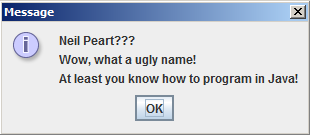 We saw in the last article that the dialog boxes are very used to display messages (mainly for errors and alerts), and show how to do this in Java.
However, it can also be used (and we show how to do this) to receive data from the user by an interface more friendly and graphical :)
Displaying messages by dialog boxes
 Dialog boxes are most simpler kind of graphics that we will se in our Java course. But no less important, and certainly the most common that we see.
Are seen as error messages and warnings in the operating systems.
We will show how to declare and display messages via dialog boxes.
Graphics programming in Java, GUI and 2D: Introduction
Let's start in our online Java course to use graphics in Java, and so let's start with the famous dialog boxes, which are those little windows with buttons and messages, we usually see with some warning or error alert.

Exercises involving methods
 Feel free to practice your creativity, using what ever you learned you want (while, for, do ... while) commands (switch, break and continue), if else conditionals tests or even nothing ;)
However, as we are in the methods section, it is important to train and use methods, the return statement, and parameters and arguments on all issues below:
Method overloading: declaring methods with the same name
+em+Java.jpg "Learn what it is and how to do Method overloading in Java")
In our article about parameters and arguments in Java, we show an example of a method that takes a number and returns the square of that number.
But this method has a limitation: it only received integers.
And if you want to create methods with float? double?
Make an overload.
Game: Guess the number raffled by the computer
 Play a game is very good and fun... but playing a game that you have created, is a pleasure that just a few have.
The Java programming language is known to be widely used for creating games. Most likely you've played a game, even online ones, are done in Java.
Based on the knowledge gained in our online course of Java, it is possible to create a game.
Although very simple, it is quite genious and cool.
The computer will randomly select a number between 1 and 1000 and you have to guess what number this is.
Each round you enter a number and the computer will give you the tips, saying the number you typed is greater or less than the number it choose.
Ends when you hit, and he keeps the number of attempts you made. Can you beat your own record?
You know what's the best strategy?
Math Class: constants, main methods and calling methods from other classes
+do+Java.+Al%C3%A9m+de+aprender+como+chamar+m%C3%A9todos+de+outras+classes..jpg "Learn the main methods, constants and how to use the Math class in Java. And learn how to make call to methods from other class.") Let us study an important class, the Math Class, which comes several mathematical functions that will help us greatly in our complete an free Java course.
Let us study an important class, the Math Class, which comes several mathematical functions that will help us greatly in our complete an free Java course.Allied to this large and powerful class with our Methods section, we'll learn how to use the methods that are declared in a different class that we're making the call.
Parameters and Arguments: passing information for methods
In our Java course, so far, our methods were very specific things, such as displaying a string, a menu or performed mathematical calculations.
Therefore, in practice, is not very useful.
Therefore, in practice, is not very useful.
App: Simple menu using methods, loops and switch
 Using a method to display a menu of options
Focusing on the goal of our Java course, and show that it is doing useful things, we show a utility method that simply display messages on the screen.
Subscribe to:
Posts (Atom)